Your notebook already knows what to sell to each customer. You just sell.
Libreta reads your ERP and builds each rep’s day: the route, what to offer every customer and who needs to pay. Orders are entered on the phone and flow straight into your system. The supervisor sees it all from one dashboard.
- Every visit has a reasonWhat to restock, what new to offer and what to collect, customer by customer.
- Orders, typed only onceEntered on the phone with the price list, and straight into your system.
- The field, in plain sightSales vs. target, visits and customers going cold.
Try it here. This is the rep’s app, live. Tap “Start” and walk through a day in the field.
- Doria
- Zureo
- Odoo
- SAP Business One
- Memory
- GNS
From the data already in your system to visits that sell more.
- Today’s invoices and credit notes08:00
- Balances and collections by customer08:00
- Price list 3 (wholesale)07:30
- New customers and address changes07:30
- Stock by warehousehourly
Connected to Doria. For other systems, we build the connector during setup.
| Code | Product | Qty | Amount |
|---|
Your whole field team on one screen.
Five screens: the day in the field (who’s out, how routes are going, which orders came in and what needs your answer), each rep against target, the extra sales Libreta brings in, customers who stopped buying or owe money, and the order inbox for your system. Try it: enter an order or report a detour on the phone above and watch it arrive. Approve the detour here and María gets notified.You can try it on a computer.
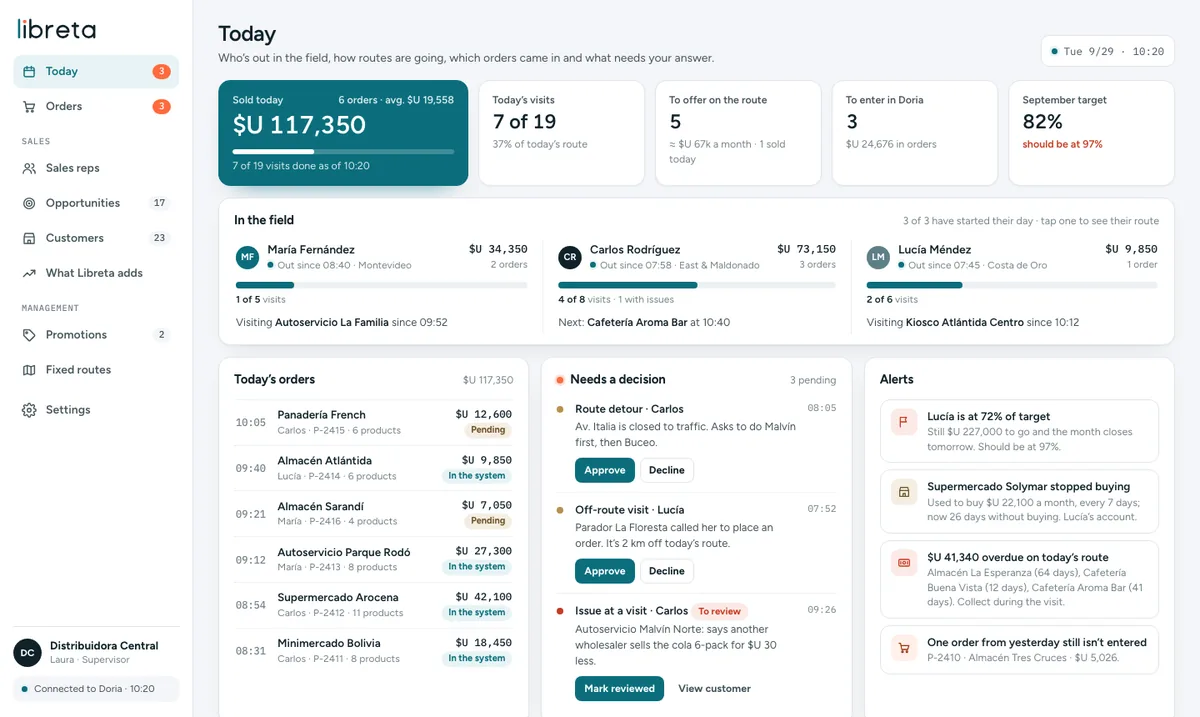
Sample data from a consumer goods distributor with three reps. The dashboard runs on a computer; reps use the app on their phones.
Run the numbers on your accounts.
It’s an estimate with your numbers, not a promise. Adjust the assumptions and see how much more each rep would need to sell to pay for Libreta.
- Fewer customers slipping away unnoticedAnyone who stops buying shows up under “Win back” and in the dashboard, with what they used to buy.
- Fewer pricing errorsOrders use the customer’s price list with today’s price. No copying from paper.
- Less time in the officeNobody prints lists for the field or keys in orders by hand. Reps head out with everything on their phone.
- Collections on the visitOverdue invoices show up for the rep before they walk into the store.
One price per rep, everything included.
Rep app, supervisor dashboard, assistant and connection to your system on every plan. Supervisor users are free. Prices in US dollars, plus taxes.
Field
1 to 5 reps
- Full rep app: route, opportunities, orders, accounts, prospects, price list and quotes
- Supervisor dashboard
- Direct connection to your ERP
- Orders flow into your system automatically
- AI assistant in the app and dashboard
Team
6 to 20 reps
- Everything in Field
- Fixed routes, targets and commissions per rep
Scale
21+ reps
- Everything in Team
- Multiple branches, warehouses and price lists
- Scheduled email reports
- Priority support and API
What people ask us before getting started.
Still have questions? Book a demo and we’ll go over them on the call.
Do we have to enter customers and prices all over again?
No. Libreta pulls customers, invoices, balances and price lists from your ERP and keeps them updated on its own. Reps never re-enter anything that already exists.
Which systems does it work with?
Today it connects directly to Doria. For Zureo, Odoo, SAP Business One and other systems, we build the connector during setup. Every plan includes the connection to your system.
How does it know what to offer each customer?
It looks at purchase history. If a customer buys something every two weeks and three have gone by, it’s a reorder. If 8 out of 10 customers who buy dish soap also buy bleach and this one doesn’t, it’s a cross-sell. If they stopped buying, it’s a win-back. If they have overdue invoices, it’s a collection. Every opportunity says why it shows up and how much it’s worth per month.
Does the order go straight into my system?
Yes. It goes into your system as an order, with the customer’s price list, ready to be invoiced. The supervisor sees it instantly in the dashboard.
Can the assistant do anything without me knowing?
No. Before creating a task, moving a visit or changing a route, it shows you exactly what it will do and waits for you to confirm. It only skips asking when it’s just looking up data.
Do reps have to download an app?
It opens on the phone, on Android or iPhone, and is saved to the home screen like any app. No app store needed.
Does it track where reps are all day?
No. It only logs arrival and departure at each visit, and only during the workday, between “Start” and “End.” We handle data under Uruguay’s Personal Data Protection Law 18.331 and help you inform your team.
How long until it’s up and running?
Two to four weeks, depending on your system and number of reps. That includes loading routes, targets and commissions, plus training for your field team.
Let’s see how your team sells.
We’ll show you Libreta running on your company’s data and send you a proposal with setup and monthly pricing.
- We set up a 30-minute meeting, at your office or by video call.
- You tell us how many reps you have, which system you use and how routes are planned today.
- We send you a proposal with your numbers and a rollout plan.
Pick a day and time.
The calendar opened with your details filled in. Choose a time that works for you and you’ll get a confirmation by email.